
How flexographic printing works, in plain language
Walk down any store aisle and most of what you see was printed by flexography. Flexo is the quiet workhorse behind labels, stand-up pouches, and printed corrugated — and understanding how it works helps you brief a printer, control cost, and design files that behave on press.
THE SHORT ANSWER
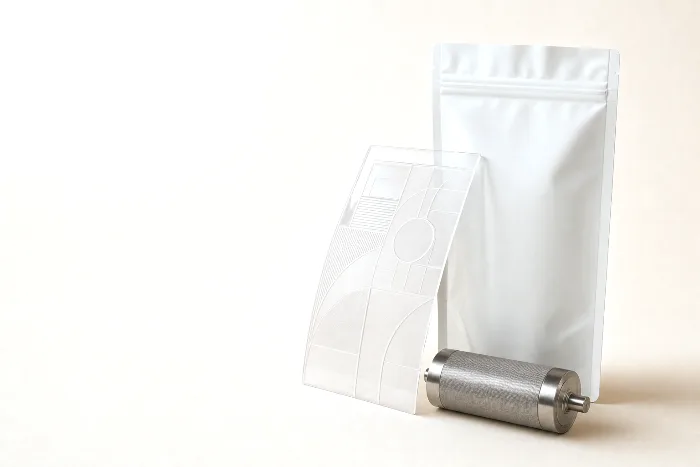
Flexographic printing (flexo) prints from a flexible relief plate. An anilox roll meters a thin, even film of ink onto the raised image on the plate, and the plate presses that ink onto a fast-moving web of material. That combination — a soft relief plate, metered ink, and a continuous web — makes flexo the workhorse of labels and flexible packaging, and it is at its best on longer, stable runs and jobs built around spot colors.
- One plate per color — more colors means more plates and more setup.
- The anilox meters the ink, keeping coverage even across a long run.
- Prints on almost anything — film, foil, paper, label stock, corrugated.
- Strong on spot/brand colors and opaque white, especially on clear film.
- Best economics on longer runs; digital usually wins short runs and many versions.
What flexographic printing is
Flexographic printing — flexo for short — is a relief printing process. That means the image to be printed sits raised above the rest of a flexible plate, like a rubber stamp: ink lands only on the raised areas, and those areas press onto the material. Flexo is the modern, high-speed descendant of letterpress, re-engineered to run on soft photopolymer plates wrapped around rotating cylinders and to print on a continuous roll — a web — of material rather than on individual sheets.
That web-fed, rotary design is what makes flexo fast. The material never stops; it threads through one print station after another, picking up a different color at each, and comes off the far end printed, sometimes coated, sometimes already die-cut. It is the process behind the majority of pressure-sensitive labels, stand-up pouches and other flexible packaging, a good deal of folding-carton work, and printed corrugated. If you have ever peeled a label off a bottle or read the back of a snack pouch, you have almost certainly held flexo in your hand.
Flexo is only one of several ways to decorate packaging, and it is easiest to understand alongside the others. This article is part of our guide to packaging printing methods, which sets flexo next to digital, gravure, offset, and the specialty decoration processes so you can see where each one fits.
How flexo actually works
A flexo press is really a line of near-identical print stations, one per color. The web threads through each in turn, so an eight-color press is eight of the same unit bolted together. Inside a single station, four parts do the real work.
| Part | What it does | Why it matters |
|---|---|---|
| Plate cylinder | Carries the flexible relief plate; only the raised image touches the material | One plate (and mounting) per color |
| Anilox roll | Engraved with tiny cells that each hold a fixed volume of ink | Meters the ink so coverage stays even across the run |
| Doctor blade | Wipes the surface of the anilox clean | Only the ink held in the cells prints, keeping density consistent |
| Impression cylinder | Backs the web as the plate presses against it | Controls print pressure and clean contact |
The anilox is the part that makes flexo flexo. Rather than flooding the plate with ink and hoping for the best, the engraved cells pick up a precise volume, the doctor blade scrapes the surface clean, and only that metered film transfers. That is how flexo holds even ink density from the first copy to the last on a very long run. Here is the ink path in order:
- Ink is fed into a chamber or fountain against the anilox roll.
- The anilox picks up ink in its engraved cells; the doctor blade wipes the surface clean.
- The anilox transfers a metered film of ink to the raised image on the plate.
- The plate cylinder rotates and presses that ink onto the moving web, backed by the impression cylinder.
- The ink is dried or cured — hot air, UV, or electron beam, depending on the ink — before the web reaches the next color.
Because each color needs its own plate, anilox, and station, presses are described by how many colors they can run. Extra stations are often kept for a coating, a varnish, or an opaque white laid down first on clear or metallic material. Getting every color to land exactly on top of the last — register — is controlled station to station, which is why file setup and trapping matter so much. A design built with tight, hairline knockouts against a busy background is asking a lot of any press; a design built with a little overlap forgives the normal, tiny movement of the web.
Where flexo shines
Flexo earns its "workhorse" reputation because it is good at several things at once:
- Speed and throughput. Once a job is set up, a web press runs fast and steadily — exactly what long label and flexible-packaging runs need.
- Substrate range. Flexo prints on an unusually wide range of materials: films, foils, self-adhesive label stock, paper, paperboard, and corrugated. Its soft plate conforms to surfaces that stiffer processes struggle with.
- True spot and brand colors. Flexo lays down solid, saturated spot inks cleanly, which is ideal for a brand color that has to match across every run. If you are weighing named spot inks against a process build, see spot color vs CMYK.
- Opaque white and specialty inks. On clear film or a metallic substrate, flexo can lay a dense opaque white beneath the artwork so colors do not print see-through, plus metallics and other specialty inks.
- Long-run economics. The cost of cutting plates is a one-time, up-front charge; once you are on press, the added cost per unit is low. The longer and steadier the run, the more that plate cost spreads out — which is why flexo is the default for high-volume labels and pouches. We break the tooling side down in printing plates & tooling costs.
The trade-offs of flexo
No process is free of compromise, and flexo's weaknesses are the mirror image of its strengths:
- A plate for every color. Each spot color needs its own plate and station, so adding colors adds tooling and setup. Designs with many spot colors — or frequent color swaps — get more expensive to tool.
- Make-ready and setup. Mounting plates, setting register, and dialing in ink takes time and material before the first good copy comes off. That fixed setup is why short runs are inefficient on flexo: you pay the make-ready whether you print a few hundred units or a few hundred thousand.
- Fine-detail limits. Relief printing spreads ink slightly where the plate meets the substrate (dot gain), so very fine type, delicate reverses, and perfectly smooth vignettes are harder than on offset or digital. High-definition flexo plating has narrowed this gap a great deal, but it is still a design consideration.
- Version changes mean new plates. If you run many SKUs or frequently updated artwork, re-plating each version adds up. That is the classic case for digital.
Flexo vs digital: when to pick which
The most common real-world decision a packaging buyer faces is flexo versus digital, and it comes down to a few variables. Digital skips plates entirely, so it wins where flexo's setup is the bottleneck; flexo wins where its per-unit economics and substrate range pay off.
| Factor | Flexo | Digital |
|---|---|---|
| Run length | Efficient on long, stable runs | Efficient on short runs |
| Versions / SKUs | Each version needs new plates | Swap files freely, no plates |
| Variable data | Not practical | Native (serials, unique codes) |
| Spot / brand colors | Excellent, true spot inks | Often simulated in process color |
| Opaque white | Strong, dense whites | Depends on the press |
| Substrate range | Very broad (film, paper, corrugated) | Narrower, press-dependent |
| Setup / make-ready | Higher up front | Minimal |
| Added cost per unit at volume | Low once running | Rises with volume |
There is no universal winner — the honest answer is "it depends on run length, version count, and color needs." We compare the two head to head for labels in digital vs flexo labels, and cover digital on its own in digital printing for packaging. As a rule of thumb: if your job has stable, long runs and locked-in spot colors, flexo is usually the more economical route; if you are running short quantities, many versions, or variable data such as serial numbers, digital usually wins.
A neutral guide, because we sell no press
Here is the part a lot of printing content quietly leaves out: most printers recommend the method they happen to own. PackOS does not. We — and our manufacturing parent, Calyx Containers — are not in the business of selling you one press, so this guide has no reason to crown a permanent favorite. The right method is the one that fits your format, substrate, run length, version count, and color needs, and sometimes that is flexo, sometimes it is digital, gravure, or offset.
If you want a fast, structured way to narrow it down, the print method selector walks through those same variables and points you at the process that fits — no sales pitch attached. Think of flexo as the strong default for long, stable label and flexible-packaging runs, and treat the other methods as the specialists you reach for when the job pushes past what flexo does well.
How PackOS uses print-method data
When you bring artwork or a spec into PackOS, the platform reads the structure and the color build, then factors the print method into the quote — because the method changes plate count, setup, substrate options, and lead time. A four-color spot design on film prices differently from a full-process job on paperboard, and the platform accounts for that instead of hiding it. You can see how the quality and pre-press side works on our technology page, or just upload a real file and let it price the job. Get us the artwork and the format, and the right process — and its cost — fall out the other side. When you are ready, you can start a Quick Quote on your own file.
Frequently asked questions
What is flexographic printing?
Flexographic printing, or flexo, prints from a flexible relief plate. Each color has its own plate carrying a raised image; an anilox roll meters a precise film of ink onto the plate, and the plate presses that ink onto a moving web of material. It is the workhorse process for labels, flexible packaging, and printed corrugated.
What is an anilox roll?
An anilox is a hard roller covered in millions of tiny engraved cells that hold a fixed volume of ink. It transfers a controlled, even film of ink to the printing plate, which keeps ink coverage consistent across a long run. The cell count and volume are matched to the ink and the level of detail being printed.
Is flexo better than digital printing?
Neither is universally better. Flexo tends to win on long, stable runs, true spot colors, opaque whites, and its very broad range of substrates. Digital tends to win on short runs, many versions, variable data, and fast turnarounds because it needs no plates. The right choice depends on run length, version count, and color needs.
Why does flexo need a separate plate for each color?
Flexo applies each ink color from its own plate and print station, so a design with more spot colors needs more plates and more setup. This is why flexo favors longer runs, where plate and setup costs are spread across many units, and why reducing the number of colors can simplify and cheapen a flexo job.
What materials can flexo print on?
Flexo prints on an unusually wide range of substrates, including paper and paperboard, the films used for flexible packaging, self-adhesive label stock, foils, and corrugated. Its soft plates and metered ink let it hold an even layer on both smooth and textured materials, which is a big reason it dominates labels and flexible packaging.